Encryption v1
Enable encryption for specific columns in your database to protect sensitive data. Encryption safeguards confidential information against unauthorized access and is recommended for handling sensitive fields such as personal identifiers, financial data, or authentication credentials. Encryption is supported for all sources with many integrated connection types.
Encrypted entities cannot be edited
Encrypted entities cannot be edited once created. If you need to make changes, you must delete the entity and create a new one.
Enable encryption
Before you can use encryption, ensure that Data Privacy Encryption is initialized in your Fabric environment. For more information, see: Initialize Data Privacy Encryption in Fabric.
Info
When encryption is applied, the column is replaced by another column named {columnname}_encrypted.
These columns will always be of datatype String.
For more details, see Data Privacy.
Encrypt your data
To encrypt your data, follow these steps:
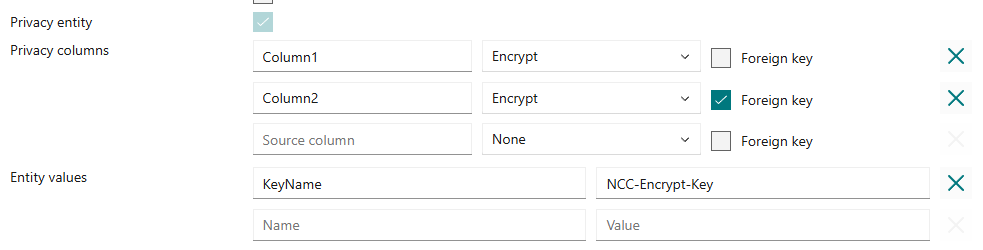
- Enable encryption by selecting the Privacy Entity option for your entity.
- Enter the exact (case-sensitive) column names to encrypt.
- Choose your preferred privacy option for each column (currently only
Encryptis available). - Add the name of your encryption key in Entity Values under
KeyName.
Warning
Foreign keys are hashed in addition to being encrypted. Hashing is less secure than encryption, but it allows for foreign key relationships to be maintained.
Deduplication
For privacy entities, the deduplication mode should be configured in the Landing Zone entity values instead of the Bronze Layer entity values. For more details about what options you have for the deduplication modes, see Deduplication Modes.
Custom notebooks
Follow these steps to enable encryption for your custom notebook.