Manage promotions in NCC Portal
Promotions in NCC Portal allow you to move entities across environments in a controlled and scalable manner. Each entity is promoted individually, ensuring readiness for each environment and supporting efficient resource management throughout your solution.
Why use promotions?
Promoting entities between environments helps maintain solution reliability. Advancing entities through environments enables early detection and resolution of issues, upholds quality standards, and ensures a smooth transition to production.
How to promote data sources
Promoting data sources is different from promoting entities.
A data source is added automatically to the next environment when you promote an entity that is linked to it. However, the data source connection configuration is not promoted.
ℹ️ Note:
Data source configurations can be manually added to the Data Sources tab for each environment.
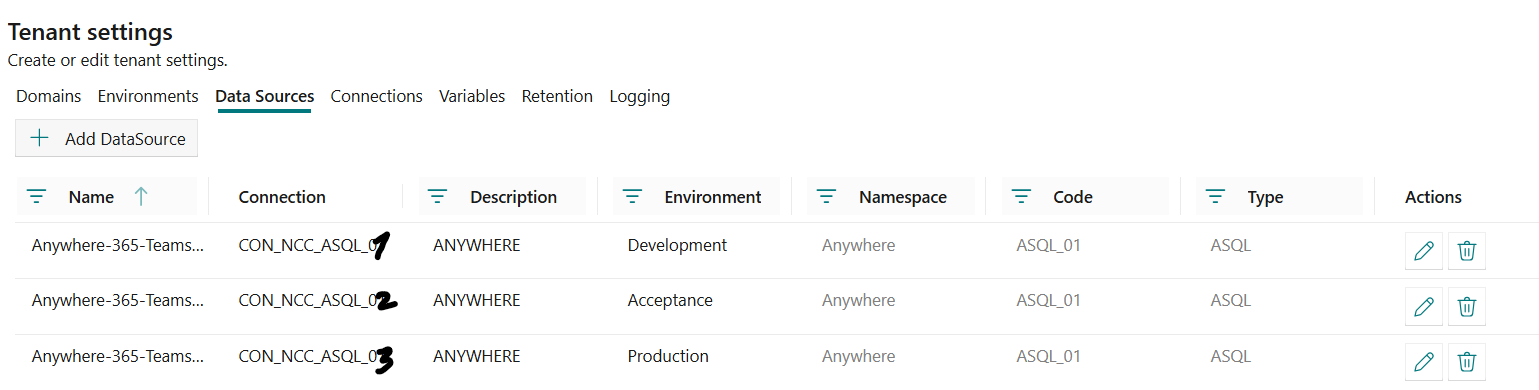
This method allows you to specify which source system each environment connects to. For example, you can connect your development environment to a development source system, preventing access to production data and protecting production systems from development workloads. This can also be set at a later stage when you have a better understanding of the differences in data sources between environments.
The following screenshot shows a data source configured in three environments, each connected to a different source system.
⚠️ Important:
When you promote your entity to the nextenvironmentand forget to add theconnectionto the data source, you will get the error while processing your data in Fabric that the connection cannot be found:
Failed to resolve connection '' referenced in activity run '********-****-****-****-************'when running your pipelines on the environment you promoted the entity to. This occurs when theData Sourcein the NCC is not linked to a Fabric Connection.
Promote entities
To open the promotions overview, go to the NCC Promotions page.
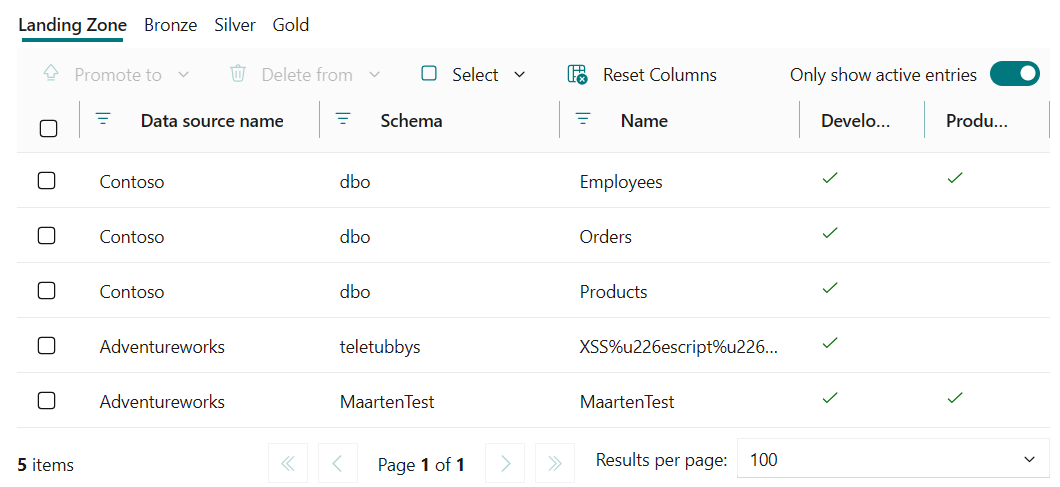
In the promotions overview, you can see which entities are available in each environment. This helps you understand which entities are currently created and promoted to which environment.
ℹ️ Note:
Entities that are out of sync are marked with an orange warning icon in the Promotions overview. Use this indicator to identify entities whose configuration differs from the version in Development and might need to be promoted again.
The toolbar above the grid contains three actions:
| Button | Purpose |
|---|---|
| Promote to | Promote the selected entities from Development to the chosen target environment. |
| Delete from | Delete the selected entities from the chosen environment. |
| Select | Quickly select entities based on their state in a specific environment (In, Not in, or Out of sync in). |
You can use the Only show active entries switch in the top-right corner of the toolbar to hide inactive entities.
Select entities
Instead of ticking entities one by one, you can use the Select menu button in the toolbar to bulk-select entities based on their state in a specific environment:
- Select → In → [Environment]: selects every entity that currently exists in the chosen environment.
- Select → Not in → [Environment]: selects every entity that does not yet exist in the chosen environment.
- Select → Out of sync in → [Environment]: selects every entity that exists in the chosen environment but differs from the version in Development.
💡 Tip:
If you have a medallion structure (landing zone, bronze, silver, gold), promoting an entity to a higher layer will also promote the layers below. For example, if a silver entity is promoted, the corresponding landing zone and bronze entity are promoted as well.
Promote entities to an environment
Promoting an entity moves it from the Development environment to a target environment. You can promote a single entity or multiple entities at the same time.
⚠️ Important:
A promotion is always performed from the Development environment, regardless of the target environment you select. The source is never one of the intermediate environments.As a consequence, every environment between Development and the selected target environment is overwritten with the Development version as well. For example, if you have three environments (Development, Test, Production) and you promote an entity from Development to Production, the version in Test is also overwritten with the Development version — even if Test already contained a different version of that entity.
To promote entities to another environment, complete the following steps:
- Open the NCC Promotions page.
- Select the entities that you want to promote, either manually or by using the Select menu (see Select entities).
- In the toolbar, select Promote to and choose the target environment from the menu.
> ℹ️ Note:
> The Promote to button is disabled when no entities are selected. - Validate the selected entities in the side panel ("You're about to promote N Layer entities listed below to [Environment]") and confirm by selecting Yes.
Delete entities from an environment
You can also remove entities from a specific environment from the promotions overview. This is useful when an entity should no longer exist in a given environment, for example when cleaning up an experiment in Production or rolling back an entity from Test.
ℹ️ Note:
Unlike Promote to, a delete only affects the environment you choose. Other environments are not touched. For example, if you have Development, Test and Production: - Deleting an entity from Production leaves the entity in Development and Test untouched. - Deleting an entity from Test leaves the entity in Development and Production untouched.Delete does not cascade between environments — each environment manages its own version of the entity.
⚠️ Important — cascade direction within a layer:
Delete cascades in the opposite direction of Promote. Promote cascades upstream (promoting a silver entity also promotes the bronze and landing zone entities it depends on). Delete cascades downstream (deleting a source layer also deletes everything derived from it): - Deleting a landing zone entity also deletes the bronze and silver entities derived from it. - Deleting a bronze entity also deletes the silver entities derived from it. - Deleting a silver or gold entity only deletes that entity; the underlying bronze and landing zone entities are kept.
To delete entities from an environment, complete the following steps:
- Open the NCC Promotions page.
- Select the entities that you want to delete, either manually or by using the Select menu (see Select entities).
- In the toolbar, select Delete from and choose the environment to delete the entities from.
> ℹ️ Note:
> The Delete from button is disabled when no entities are selected. Inside the menu, the option for an environment is only enabled when all selected entities exist in that environment. If one of the selected entities is not present in the chosen environment, the option is disabled. - Validate the selection in the side panel ("You're about to delete N Layer entities listed below from [Environment]") and confirm by selecting Yes.