Parse JSON Data with Entity Values
Entity Values enable parsing and transforming JSON data in Microsoft Fabric. This section describes how to use the Collection and DateFormat Entity Values for effective data processing.
Example JSON
For the documentation below, we use this example JSON data.
{
    "id": "1",
    "customer": "example",
    "billingAddress": {
        "street": "sesamestreet",
        "city": "anytown"
    },
    "shippingAddress": {
        "street": "sesamestreet",
        "city": "anytown"
    },
    "orders": [
        {
            "order_id": "order_1",
            "modules": [
                {
                    "code": "module_code1",
                    "name": "module_name1",
                    "purchase_date": "2024-01-01T13:00:00.000"
                },
                {
                    "code": "module_code2",
                    "name": "module_name2",
                    "purchase_date": "2024-01-01T13:00:00.000"
                }
            ]
        }
    ]
}
Collection Entity Value
Use the Collection Entity Value to specify an array from a Landing Zone entity JSON. Arrays are ordered collections of values, defined by square brackets ([]) and separated by commas.
To access collection members, use the collection name, followed by a period (.), and then the member name.
Tip
Use a period between separately quoted identifiers to access a nested member. For example, `billingAddress`.`street` reads street from the billingAddress object.
To reference a single key whose name contains a period, wrap the complete key in backticks: `billingAddress.street`
Data Processing with collection and column_mapping
Configure the collection and column_mapping settings to process JSON files using PySpark. These settings help transform nested JSON structures into a flat DataFrame.
- The
collectionfield specifies JSON arrays to explode into rows for lower granularity. - For multiple arrays:
- Nested arrays: separate with a semicolon (
;) - Non-nested arrays: use different Bronze entities from the same Landing Zone entity
- Nested arrays: separate with a semicolon (
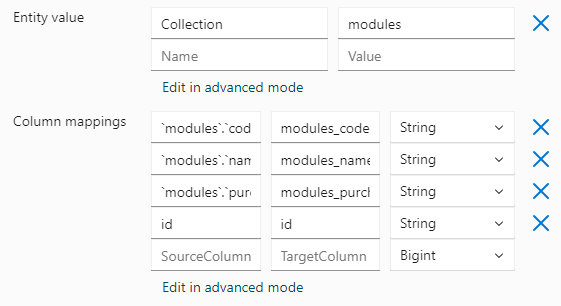
To explode the modules array, set collection to modules.
Column Mapping
The column_mapping field defines how JSON columns map to DataFrame or Delta Parquet columns. Use it to rename columns or select specific fields. Each column name should be unique.
Top-level properties
For top level properties, the column mapping is simple: the source is the JSON key, and the target is the desired column name.
Nested properties
When selecting properties within an object, use backticks to reference the nested keys as shown in the example below.
[
    {"source": "`billingAddress`.`street`", "target": "billingAddress_street"},
    {"source": "`billingAddress`.`city`", "target": "billingAddress_city"},
    {"source": "`shippingAddress`.`street`", "target": "shippingAddress_street"},
    {"source": "`shippingAddress`.`city`", "target": "shippingAddress_city"}
]
Nested arrays
For nested arrays and their properties, use backticks to reference the nested keys within the array.
[
    {"source": "`orders`.`modules`.`code`", "target": "module_code"},
    {"source": "`orders`.`modules`.`name`", "target": "module_name"},
    {"source": "`orders`.`modules`.`purchase_date`", "target": "module_purchase_date"}
]
Full configuration example
Entity values :
column_mappings:
    {"source": "id", "target": "customer_id"},
    {"source": "customer", "target": "customer_name"},
    {"source": "`billingAddress`.`street`", "target": "billingAddress_street"},
    {"source": "`billingAddress`.`city`", "target": "billingAddress_city"},
    {"source": "`shippingAddress`.`street`", "target": "shippingAddress_street"},
    {"source": "`shippingAddress`.`city`", "target": "shippingAddress_city"},
    {"source": "orders.order_id", "target": "order_id"},
    {"source": "`orders`.`modules`.`code`", "target": "module_code"},
    {"source": "`orders`.`modules`.`name`", "target": "module_name"},
    {"source": "`orders`.`modules`.`purchase_date`", "target": "module_purchase_date"}
Note
Ensure the collection field references arrays in your JSON structure.
The column_mappings should accurately map source fields to target fields in the DataFrame.
DateFormat Entity Value
The DateFormat Entity Value allows you to specify a custom date format for all datetime columns in a JSON entity.

By default, dates use the ISO-8601 format. You can change this to another format, such as "dd-MM-yyyy hh:mm:ss", to match regional preferences.
Note
The specified format applies to all datetime columns in the JSON entity.