Adaptive Security
Adaptive security is the principle of applying controls proportional to risk and impact. Instead of treating every app, agent, or flow with the same heavyweight governance, Managed AI, Apps & Agents lets you label resources with a zone. The zone determines which security baseline, approval flow, monitoring profile, and lifecycle controls apply.
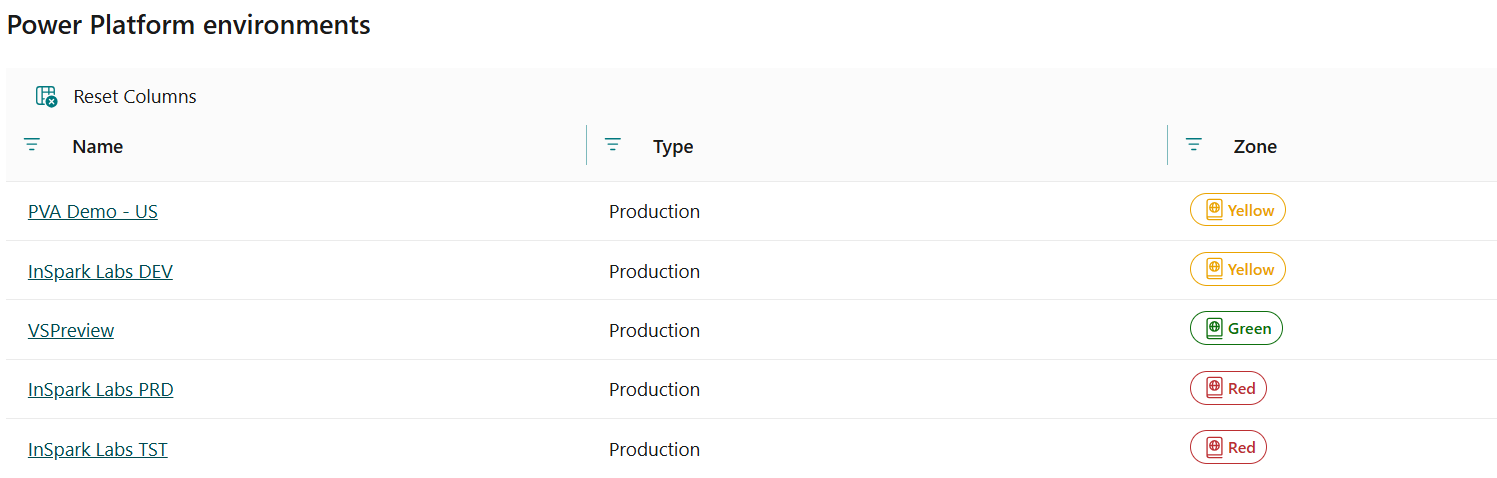
This page explains how zones work, why they matter, and how cloud engineers can guide customers through choosing the right zone during a coaching session.
Why zones matter
The problem without zones
Without a clear governance model, sprawl is inevitable. Employees build agents and flows without it being clear who is responsible, which data is processed, whether oversight is required, and what happens when the maker leaves. This leads to:
- Shadow IT — automations running outside IT's view and remaining unmanaged.
- Security risks — agents with access to sensitive data without appropriate controls.
- Compliance violations — processing of personal data without conscious consideration or consent.
- Operational fragility — business-critical processes depending on a personal flow owned by a single employee.
- Lack of accountability — nobody knows who owns the solution when something goes wrong.
What zones solve
Zones bring structure by classifying every automation based on its risk profile and impact. This makes it possible to:
- Secure proportionally — not everything needs an architecture board. Personal productivity tools stay low-friction, while business-critical systems get the right controls.
- Clarify responsibilities — for each zone it is clear who manages, who approves, and who monitors.
- Accelerate innovation — by deliberately keeping the green zone open, employees can experiment without bureaucratic friction.
- Safeguard compliance — automations that process personal data or are externally accessible are automatically routed to a higher zone with matching controls.
- Scale governance — the model grows with the organization without each new use case requiring individual review.
Key message: Zones are not a restriction, they are an enabler. They allow employees to innovate safely within clear boundaries.
The three zones
Green: Free to use
Core question: Is the employee building this only for themselves, without business-critical data?
| Aspect | Description |
|---|---|
| Audience | Individual employees |
| Trigger | Personal productivity |
| Approval | Not required |
| Management | By the employee themselves |
| Lifecycle | Expires when the employee leaves |
Rules of the game
- No bulk processing of special personal data or business-critical data.
- For personal use only, does not touch a business process.
- No support from Information Management.
Allowed technologies
- Standard M365 Copilot functionality (Copilot Chat, Word, Excel, Teams, Outlook).
- Built-in SaaS agents (Researcher, Workflows, App Builder).
- Declarative agents based on accessible M365 sources.
- Power Platform personal development environments.
Example use cases
- An employee builds a Power Automate flow with an Outlook connector to optimize email handling.
- An employee creates a flow that collects Planner tasks every Friday and emails a weekly overview.
- An employee creates a declarative agent to make their own SharePoint documents searchable.
Yellow: CoE approval required
Core question: Does this support an internal business process, without external access or sensitive data?
| Aspect | Description |
|---|---|
| Audience | Teams and departments |
| Trigger | Supporting internal business processes |
| Approval | Center of Excellence (CoE) |
| Management | Mandatory managed |
| Lifecycle | ALM deployment, version control |
Rules of the game
- No external access (for example, to customers or partners).
- No customer or relationship data processed.
- Human-in-the-loop use cases only, no autonomous agents.
- Automations must be under management.
Allowed technologies
- Copilot Studio agents with connectors to internal systems via the integration platform.
- Foundry declarative agents (prompt-based, no custom models).
- Agents that write to Dataverse or other data sources via the integration platform.
- Hybrid Copilot Studio + Foundry solutions.
- Power Automate flows coupled to AI actions.
Examples to discuss with the customer
- An AI agent for team leads to capture activities and hours per project or department.
- A Copilot Studio agent that helps employees search internal policy documents with source citations.
- A Power Automate flow that reads contract data and sends reminders before expiration dates.
Red: Architecture board approval required
Core question: Does this process customer or relationship data, is it externally accessible, or does it act autonomously?
| Aspect | Description |
|---|---|
| Audience | Professional developers and IT |
| Trigger | Supporting internal and external business processes |
| Approval | Architecture board |
| Management | Mandatory managed |
| Lifecycle | ALM deployment, version control, management via Admin Center |
Rules of the game
- All Yellow rules apply, extended with the possibility to:
- Process customer or relationship data.
- Work with autonomous agents.
- Provide external access.
- Automations must be under management.
Allowed technologies
- Foundry hosted agents (pro-code, custom runtime).
- Foundry multi-agent workflows.
- Custom or fine-tuned models.
- Integrations with external AI services or APIs that require authentication.
Examples to discuss with the customer
- An application for managing service processes with integrations to source systems for current customer and asset data.
- A multi-agent system where agents collaborate to classify incidents, retrieve history, and draft a response.
- A mobile app where field workers take photos and a vision model classifies the situation.
- A workflow that retrieves outstanding payments and automatically builds dossiers for the finance department.
Overview: zones on four axes
| Green Zone | Yellow Zone | Red Zone | |
|---|---|---|---|
| Purpose | Citizen-dev agent creation (DIY) for personal use with safe default settings. | Team or department agents under a coach's supervision, built by trained citizen developers. | Large, potentially risky apps and agents exclusively for pro-dev and IT-led development. |
| Secure | M365 and Power Platform connectors only. Agents run in the user context. | Zone-specific policy with access to approved data sources. Sharing via security groups is required. | Zone-specific advanced connector policies in Power Platform Admin Center plus Purview. |
| Govern | Developer environments. Environment routing keeps agents isolated to the maker. Sharing is restricted. | Admin-approved environments. Specified roles and sharing policies. ALM deployment for version control. | Sharing managed via Microsoft Admin Center. ALM deployment for version control. IT admin approval required. |
| Monitor | Agent usage monitored within Power Platform and the InSpark Cloud management portal. | Agent usage and security posture tracked in Microsoft Admin Center, Purview, and Power Platform Admin Center. | Agent usage and security posture tracked in Microsoft Admin Center, Purview, and Power Platform Admin Center. |
Coaching session: how to determine the zone
Use the decision model below to place each use case in the right zone together with the customer.
Step 1: Who is the user?
- Only the maker themselves → likely Green.
- A team or department → at least Yellow.
- External parties (customers, partners, suppliers) → Red.
Step 2: Which data is processed?
- Only the user's own M365 data (mail, documents, tasks) → Green.
- Internal business data without personal data → Yellow.
- Customer or relationship data, or special personal data → Red.
Step 3: How autonomously does the automation act?
- The user initiates and validates everything themselves → Green or Yellow.
- Human-in-the-loop: the system proposes, the human decides → Yellow.
- Autonomous: the system acts on its own → Red.
Step 4: Is there external access?
- No, internal only → Green or Yellow.
- Yes, for external parties → Red.
Decision tree
Is it for personal use only?
  Yes -> Does it process sensitive data?
           No  -> GREEN
           Yes -> YELLOW or RED (assess severity)
  No  -> Does it support a business process?
           Yes -> Does it process customer data or is it externally accessible?
                    No  -> YELLOW
                    Yes -> RED
           No  -> Is it autonomous?
                    Yes -> RED
                    No  -> YELLOW
Cascading via environments in the portal
In the Managed AI, Apps & Agents portal, zones are assigned at the environment level. All apps, agents, and flows within an environment automatically inherit the zone. This means:
- You do not need to assign a zone to every individual resource.
- New resources in an environment automatically receive the correct zone.
- Changes at the environment level are immediately applied to all underlying resources.
This principle makes it easy to apply governance consistently without manual work per resource.
This page is part of the Managed AI, Apps & Agents governance framework. For questions, contact the team.