Post Deployment Steps
After going through the deployment steps, there are a few manual steps that need to be taken to finalize the setup of NCC. This is mainly due to some limitations in the current Microsoft Fabric APIs that require some manual configuration for certain features to work properly. In the future, we aim to automate these steps as much as possible, but for now, these steps need to be taken manually. Below you can find more information on these steps and how to complete them.
Workspace Identity support
NCC uses Workspace Identity as the authentication wherever possible. The advantage of using Workspace Identity is that it allows for a more seamless and secure authentication experience, as it eliminates the need for users to provide their own credentials when running notebooks or pipelines.
During the enrollment you will have selected a security group to which NCC expects that every Workspace Identity will be added to. This is required to allow the Workspace Identity to call the required Fabric and NCC APIs. This security group is also added as Key Vault Crypto Officer and Key Vault Secrets Officer during the deployment, which allows the Workspace Identity to read and use keys and secrets from the Key Vault.
Fabric Admin Portal Configuration
Warning
You must be a Fabric administrator to view and change the Fabric Admin Portal tenant settings page.
- In Fabric Admin Portal tenant settings, go to
Developer settings - Enable
Service principals can call Fabric public APIsfor the security group that was selected during enrollment.
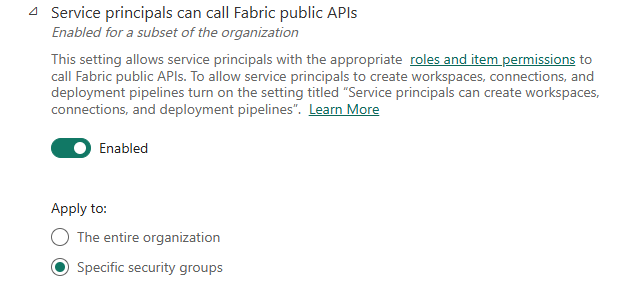
This allows the Workspace Identity to call the Fabric APIs, which is required for the notebook connection and data pipelines connection to work properly. Data Pipelines run as the Workspace Identity instead of the user who triggered the pipeline. Notebooks also use the Workspace Identity to connect to the Fabric tenant instead of the user who runs the notebook. This improves management and security because access is controlled through the security group instead of individual user accounts.
Note
Workspace Identity can only be assigned to the security groups after the Workspace deployment (Domain Wizard) has finished. This is because the Workspace Identity is created during the workspace deployment. You will need to manually add the Workspace Identity to the security group in Azure Entra. For more information.